




Rangliste
-
Phil
Administratoren8Punkte5.654Gesamte Inhalte -
kazin
Mitglieder6Punkte1.420Gesamte Inhalte -
ShadowMP
Administratoren1Punkte7.481Gesamte Inhalte -
renonskaro
Mitglieder1Punkte467Gesamte Inhalte




Beliebte Inhalte
Inhalte mit der höchsten Reputation am 03.09.2020 in allen Bereichen anzeigen
-
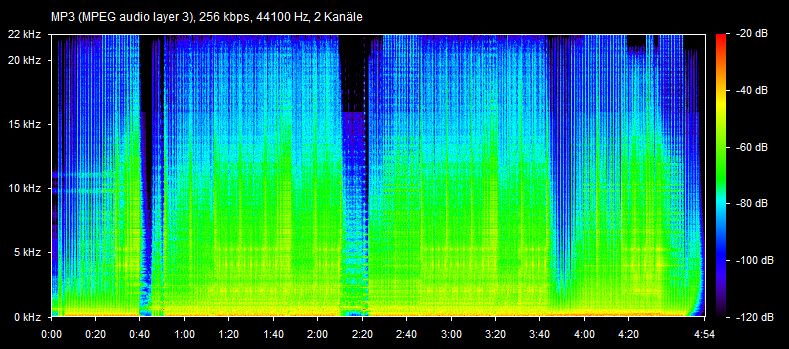
4 PunkteInteresting "side analysis" ... 😄 I think you need to get the "OPUS 160 kbps" version from YT. But this is the "Amazon version" of Stai Mosso, which is not cut at 20 kHz: Back to topic... Finally "Mulino a Lento"! What a song from the year zero sei ies orez zero sei ies orez zero sei ies orez zero sei ies orez zero sei ies orezero sei sta suonando il pittore Gigi D'Agostino! 😆💢
 4 Punkte
 -
1 Punkt
-
Album DendoStyle by Mr Dendo will be released 11.09.2020 on all digital platforms.1 Punkt
-
1 PunktI found best price-quality ratio solution - Spotify Premium. You have 320 kbps quality + ability to listen music offline. Also you can record the music you listen while you listening... and here is your 320 kbps release 🙂1 Punkt
Diese Rangliste nutzt Berlin/GMT+02:00 als Grundlage