Rangliste




Beliebte Inhalte
Inhalte mit der höchsten Reputation am 10.12.2020 in allen Bereichen anzeigen
-
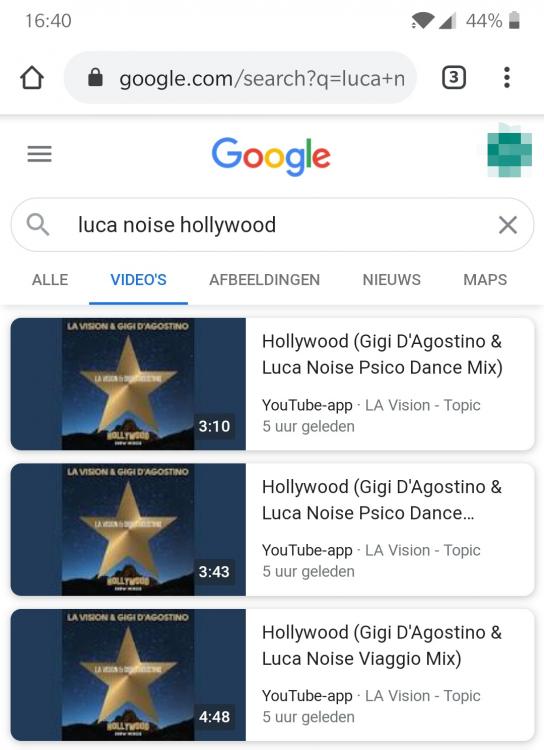
Tracklist... And take a look at the Mix names! Hollywood (Gigi d'Agostino & Luca Noise Psico Dance Mix) 3:10 Hollywood (Gigi d'Agostino & Luca Noise Psico Dance extended Mix) 3:43 Hollywood (Gigi d'Agostino & Luca Noise Viaggio Mix) 4:484 Punkte
-
OK für mich ganz klar psico dance Version 👍👍 Bin ich hier der eintzige der diese Version besser gefällt?2 Punkte
-
Habe die Tracks gehört. Die Psico Dance Versionen sind mMn jetzt nicht so besonders. Nicht schlecht per se, aber nix besonderes. Der Viaggio Mix hingegen ist die mit Abstand beste Version des Tracks mMn und erinnert mich an die Suono Libero. Der alte "Extended Mix" ist auch noch zusätzlich beim release dabei. Meiner Meinung nach ziemlich unnötig auf einer "New Mixes" Ausgabe. Die Instrumentalversion bleibt weiterhin Vinyl-Only.2 Punkte
-
Bei dem kurzen Preview den es auf YouTube gab haben Sie wenigstens nicht all zu viel Spielraum den Track merklich zu kürzen.2 Punkte
-
1 Punkt
-
1 Punkt1 PunktYes, I have the same question. Only legal ways please.1 Punkt1 Punktdann sind das Die beiden Hollywood Versionen die Auf der Pisco Dance mit darauf sind oder? @Erdbeer Wolf bin Ganz deiner Meinung mit der Psico Dance1 PunktLittle trick on Google video, sameway other persons found tracklist from previous releases. See screenshot attached
 1 PunktWie geil ist das denn? Hatte die Psico Dance ja auch nie abgeschrieben. Freut mich sehr das zu lesen 🙂1 PunktDiese Rangliste nutzt Berlin/GMT+02:00 als Grundlage